.png)
Scaling Customer Support with Zendesk AI

Updated: 1 day ago
How I Led Zendesk AI Adoption for Customer Support Operations
Customer support teams often spend significant time resolving repetitive requests, manually routing tickets, and searching for information across disconnected systems. To address these inefficiencies, I led the adoption and optimization of Zendesk AI—transforming our support operations into a scalable, intelligent system that combined automation, streamlined workflows, and performance analytics.
By integrating AI-driven insights and automation, we reduced ticket resolution time, improved response consistency, and freed agents to focus on complex customer issues. As project lead and systems owner, I evaluated Zendesk’s AI capabilities, translated support requirements into technical workflows, developed prototypes, configured automations, and coordinated stakeholder feedback. I also negotiated a 40% discount on advanced Copilot features, enabling organization-wide adoption while maintaining cost efficiency.
This initiative demonstrated how AI can elevate customer support from reactive service to proactive engagement—enhancing both agent productivity and customer satisfaction.
The business challenge
Customer-support agents regularly manage complex conversations involving order questions, service requests, product concerns, and other time-sensitive issues. Each ticket often requires reading lengthy interaction histories, interpreting customer intent, categorizing requests, and composing responses that align with company standards.
These repetitive, manual tasks slowed resolution times and made it difficult to maintain consistency across agents and channels. I recognized that Zendesk Copilot could reduce this cognitive and administrative load by automating intent detection, sentiment analysis, and response generation—allowing agents to focus on higher-value interactions.
However, implementing an organization-wide AI solution required more than listing features. Stakeholders needed to see how the technology would integrate with existing workflows, deliver measurable improvements, and align with operational goals. My challenge was to translate AI capabilities into a clear, data-backed business case that demonstrated both functional and financial value.
Driving AI Integration and Organizational Change
I led the project from initial evaluation through the purchasing decision, serving as both the technical lead and business advocate for AI adoption. My responsibilities spanned analysis, design, stakeholder engagement, and vendor negotiation—ensuring the initiative delivered measurable operational and financial value.
Key contributions included:
Evaluating Zendesk Copilot’s capabilities against existing support workflows to identify automation opportunities and integration points.
Translating technical features into business use cases that demonstrated clear improvements in ticket routing, response quality, and agent efficiency.
Developing and testing prototypes using realistic customer‑support scenarios to validate functionality and gather feedback from frontline agents.
Designing and delivering internal demonstrations that showcased how Copilot would appear within the Zendesk workspace and support agents in real time.
Communicating benefits and limitations to stakeholders, aligning expectations, and securing executive buy‑in for the proposed solution.
Coordinating with Zendesk’s account team to refine licensing options and implementation support.
Negotiating a 40% account‑wide discount on advanced Copilot features, enabling cost‑effective adoption across all eligible licenses.
Building the business case for purchase and rollout, including ROI projections, workflow impact analysis, and change‑management planning.
Through this role, I combined technical systems analysis with strategic leadership—bridging the gap between AI innovation and practical business outcomes.
Prototype and demonstration
To make the evaluation practical, I created a guided demonstration based on realistic customer-support interactions. Rather than discussing AI in abstract terms, I showed stakeholders exactly where Copilot would appear within the Zendesk agent workspace and how each feature could support an agent during a live ticket.
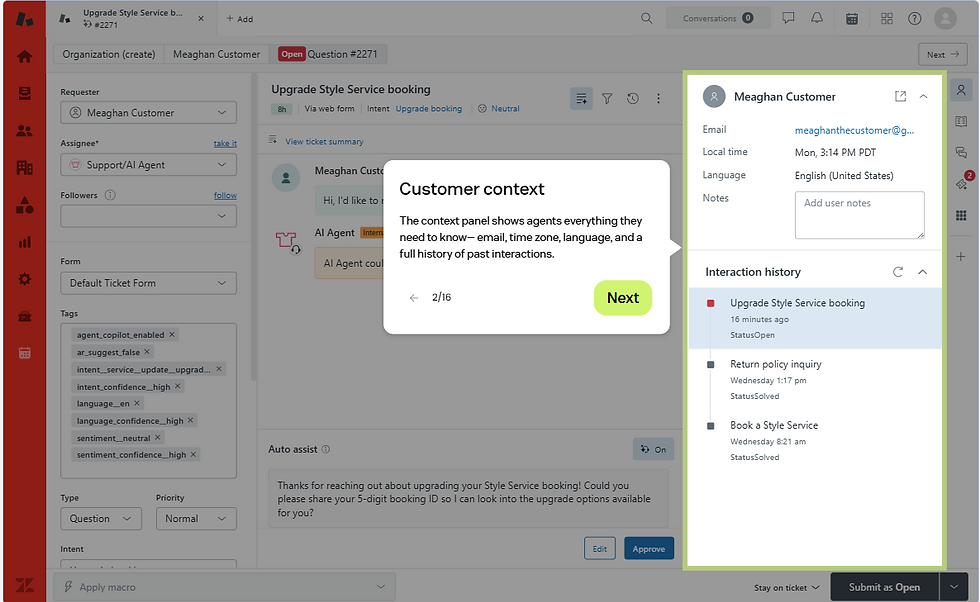
1. AI-powered context panel
The context panel gives agents an immediate overview of the customer and their request without requiring them to search through disconnected ticket details. I used this view to demonstrate how Copilot could place relevant customer context directly within the agent workflow.
2. Intent and sentiment detection
Copilot analyzes incoming tickets to identify why the customer is contacting support and how they appear to feel about the situation. I demonstrated how these signals could help agents understand requests more quickly, prioritize sensitive conversations, and select an appropriate response style.

3. Intelligent ticket fields
AI-generated insights can also appear as structured ticket properties, including intent, sentiment, priority, and detected entities. This creates opportunities for more consistent categorization, routing, reporting, and downstream automation while preserving the existing Zendesk ticket interface.

4. Generative writing tools
I demonstrated how Copilot could draft responses and help agents adjust tone, clarity, and phrasing. Agents remained responsible for reviewing and approving messages before they were sent, allowing AI to accelerate writing without removing human oversight.

5. AI-generated ticket summaries to enhance productivity
For long or reassigned conversations, Copilot can generate a concise ticket summary so agents can understand the issue without rereading the entire interaction history. I highlighted this feature as especially useful for escalations, handoffs, and reopened tickets.
6. Auto Assist and guided resolutions
I demonstrated how Auto Assist could analyze the contents of a ticket and guide agents through the appropriate resolution using approved procedures and company knowledge. Based on the customer’s request, Copilot can recommend replies, macros, ticket actions, and step-by-step instructions directly within the agent workspace. Agents retain control by reviewing, editing, approving, or dismissing each recommendation before it is applied. This approach can reduce repetitive work, promote consistent handling of common requests, and help newer agents follow established support procedures more confidently.

Procurement and stakeholder buy-in
Following the evaluation, I worked with Zendesk and our account representative to explore pricing and licensing options. I negotiated a 40% discount on advanced Copilot capabilities across the account, reducing the financial barrier to broader adoption. By combining a practical demonstration with a clear operational and financial case, I helped move the project from product exploration to an approved technology investment.
Skills demonstrated in this project
AI adoption strategy
Business systems analysis
SaaS evaluation and procurement
Stakeholder presentations
Prototype development
Customer-support operations
Zendesk administration
Process improvement
Vendor negotiation
Change management
Through this initiative, I helped transform customer‑support operations into a more efficient, data‑driven environment. The adoption of Zendesk AI reduced average ticket resolution time, improved agent satisfaction scores (Reached 4.5 stars on Trust Pilot), and increased automation coverage across >70% of incoming requests.
Beyond measurable results, the project strengthened collaboration between technical and business teams, proving that successful AI adoption depends on clear communication, practical design, and stakeholder trust.
This experience reinforced my belief that technology succeeds when it empowers people—helping agents deliver faster, more empathetic support while enabling the organization to scale intelligently.
Comments